
Please complete the connection steps described in this article before connecting to MotiveWave for the first time.
Downloading MotiveWave
If you do not already have MotiveWave installed, you can find the download link here.
Next, download the latest version of MotiveWave.
You can also request a 14-day free trial by selecting “14-Day Free Trial”.
After registration, you will receive your login credentials, license key, and instructions at the email address you provided.
Activating Your License and Setting Up the Workspace
Once you have installed and opened the platform, enter the license key sent to you by MotiveWave after registering.
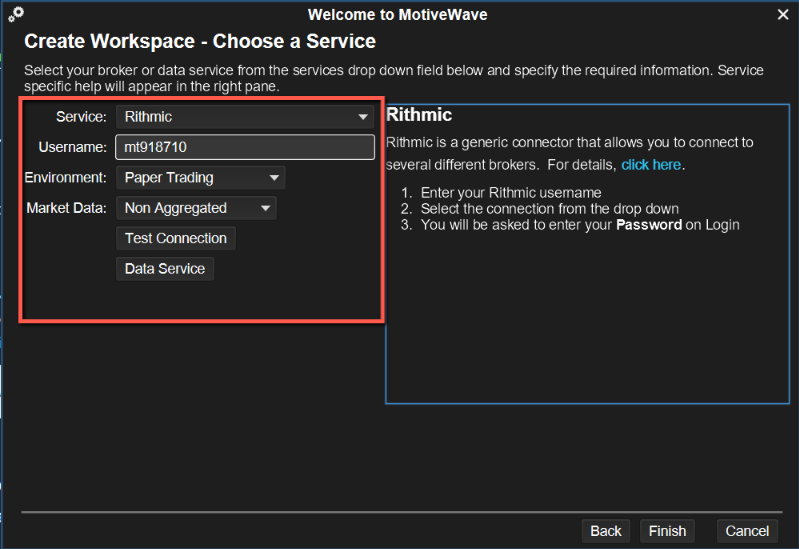
Set up your workspace by entering your Rithmic username, which you can find in your Dashboard at TakeProfitTrader.com.
Connecting Your Credentials
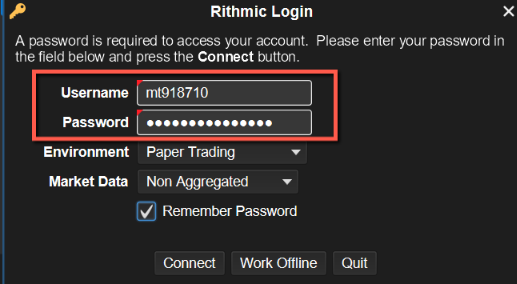
Now enter your username and password.
These are the same credentials displayed in your Dashboard.
Start Trading
After completing these steps, you can begin trading on MotiveWave.