
Please complete connection steps described in this article before connecting to MultiCharts for the first time.
If you do not already have MultiCharts downloaded, you can find the download link by clicking on the image on the homepage here.
How to Download MultiCharts
To download MultiCharts, click the Get Started button on their website and register using any email address.
After completing the registration, you will be redirected to the download page.
If You Do Not Have a MultiCharts Account
If you do not already have an account with MultiCharts, click Sign Up and choose one of their plans.
Once your account is created, use your MultiCharts credentials to access the platform.
Connecting MultiCharts to TakeProfitTrader
After signing into the platform:
Click on File in the top-left corner.
Select Broker Profiles from the drop-down menu.
Choose Manage Broker Profiles.
Add Rithmic Paper Trading as a broker.
Enter your credentials from your Dashboard at TakeProfitTrader.com.
Look up the correct Trade Route before establishing the connection.
This lookup process may take some time.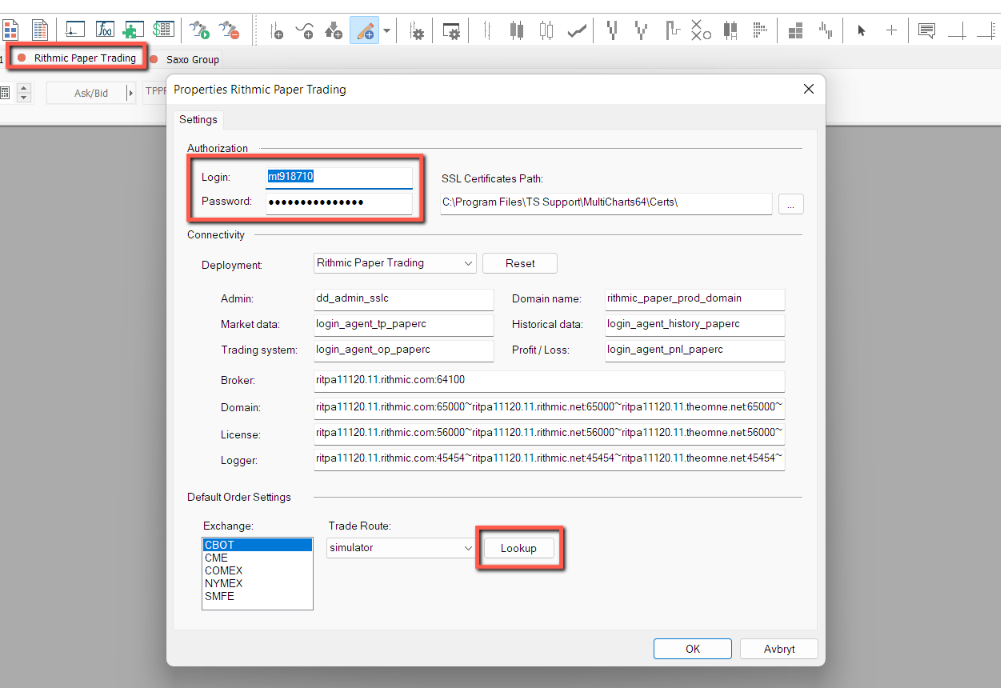
Additional Configuration Details
More detailed configuration steps can be found directly on the MultiCharts website.