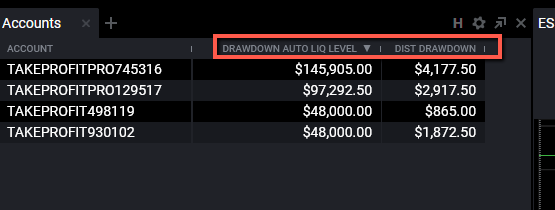
On the PRO accounts, the Trailing Drawdown is calculated intraday, which is based on your peak balance including realized and unrealized gains. The Drawdown will follow your account intraday as you experience gains, and will stop trailing when it reaches the starting balance of the account.
Here are the steps to find your drawdown in real time:
For Rithmic Accounts
- Login to RTrader Pro
- Go to your Trader Dashboard within Rtrader
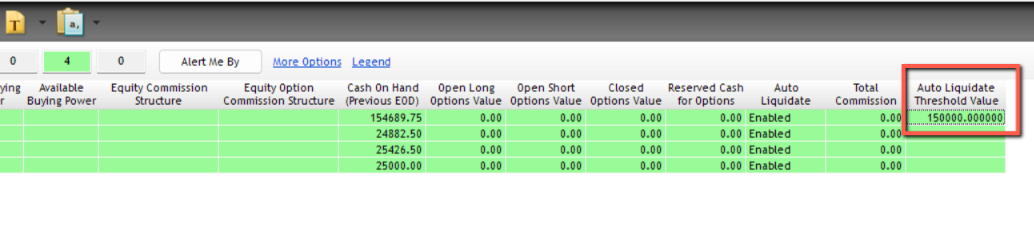
- Look at the ''Auto Liquidate Threshold Value.'' That is your minimum account balance.
For CQG Accounts
-
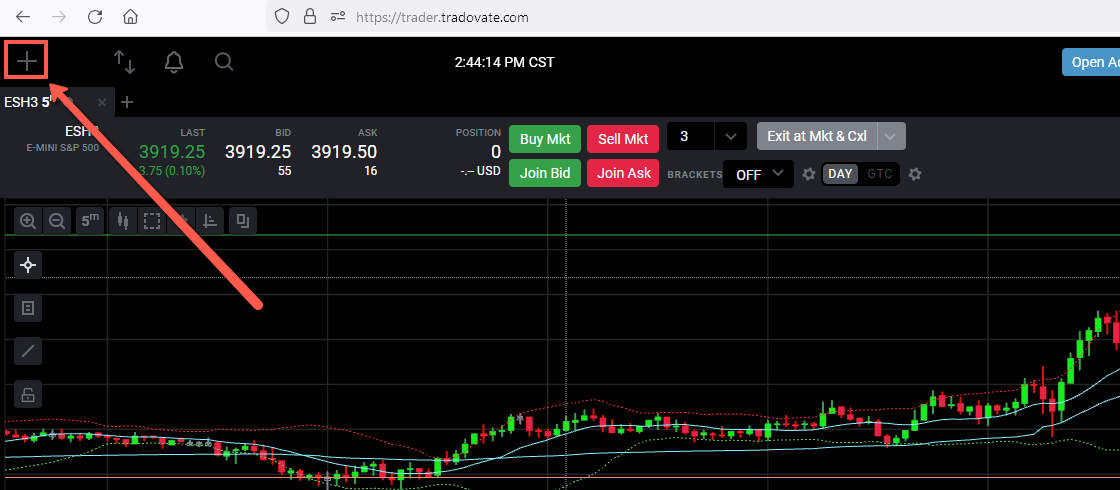
Log into Tradovate here and open the modules window by clicking the (+) sign in the top left corner of the page.
-
Select the ''Accounts'' widget and drag it onto your main screen.


-
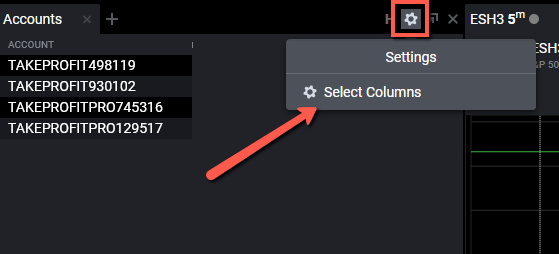
Now you have to select specific columns. You can do that by clicking settings wheel on the top of the screen and click''Select Columns''.
-
Select ''Drawdow Auto Liq Level'' to see your current trailing drawdown limit and ''Dist Drawdown'' to see how much you have left before reaching the drawdown amount.